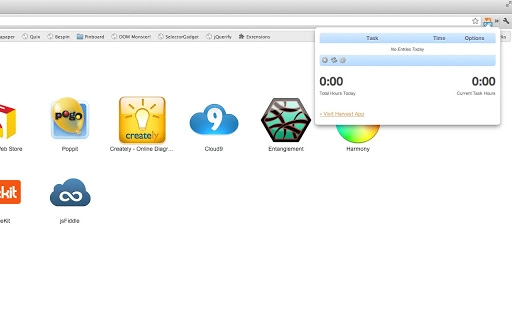

Effortless Time Tracking for Harvest Users
The Hayfever Chrome extension is a lightweight tool designed to streamline time tracking for professionals using Harvest, a popular time and expense management service. It enables users to start, stop, and manage work timers directly from their browser, with real-time synchronization through Harvest’s Time Tracking API. This integration ensures accurate logging of billable hours without requiring manual entry or switching between tabs. The extension is especially useful for web developers, freelancers, and remote teams who need precise records of time spent on client projects.
By displaying a dynamic badge with the total hours logged in a day, Hayfever provides immediate visibility into daily productivity, reducing the risk of forgotten entries. It was created by Mike Green, a web developer who experienced firsthand the challenges of inconsistent time logging. His personal need for a reliable solution led to the development of this open-source tool, which has since been adopted by others facing similar challenges.
Real-world usage scenarios include developers tracking time across multiple client projects, consultants monitoring billable hours during client calls, and remote teams maintaining accountability through transparent time logs. The tool supports cross-platform use across Windows, Mac, and Linux, making it accessible to diverse users regardless of their operating system. Its focus on simplicity and integration with Harvest makes it ideal for individuals and small teams seeking a frictionless way to maintain accurate records.
Key Features & Capabilities
- Real-Time Timer Sync – Automatically syncs timer data with your Harvest account via the official Time Tracking API, ensuring all logged hours are immediately reflected in your project reports.
- One-Click Timer Control – Start, stop, and pause timers directly from the browser toolbar with minimal clicks, reducing interruptions to workflow.
- Daily Hour Badge – Displays a visual indicator showing total hours logged for the current day, promoting awareness and accountability.
- Browser-Based Accessibility – Fully functional within Google Chrome, requiring no additional software or installation beyond the extension itself.
- Open Source Transparency – The source code is publicly available on GitHub under the GNU General Public License v2, allowing users to audit, modify, and contribute to the project.
These features help users maintain accurate time records without disrupting their workflow. For example, a web developer can start a timer while coding, pause it during a meeting, and resume seamlessly—all without leaving the browser. The badge feature acts as a gentle reminder, encouraging consistent logging throughout the day. Since the extension operates entirely through Harvest’s API, it ensures data integrity and avoids duplication or errors common in manual entry.
User Interface, Workflow & Performance
The user interface of Hayfever is minimalistic and designed for efficiency. The extension icon appears in the Chrome toolbar, displaying a badge that updates in real time with the number of hours logged that day. The badge changes color or format based on the current status (e.g., active timer, idle), offering visual cues without cluttering the interface.
Navigating the extension is straightforward: clicking the icon reveals a simple dropdown menu with options to start, stop, and manage timers. The workflow is optimized for speed—users can initiate a timer in under two seconds. The design avoids unnecessary complexity, focusing on core functionality. This simplicity enhances usability, especially for users who value quick access over advanced settings.
Performance details were not specified by the developer. However, given its small size of 1.2 MB and reliance on a stable API connection, it is expected to operate with minimal impact on system resources. The extension does not require background processes beyond maintaining the timer sync, which reduces CPU and RAM usage. Stability is maintained through regular updates and community-driven issue resolution via GitHub.
Compatibility & System Requirements
Hayfever is compatible with Windows, Mac, and Linux operating systems, as it functions as a Chrome extension and does not depend on native system components. It requires Google Chrome to run, and the specific version of Chrome is not listed. The installation size is 1.2 MB, which is compact and suitable for systems with limited storage.
Exact system requirements were not listed. The developer did not provide additional system requirements. Compatibility with older or newer versions of Chrome is not confirmed. Users should ensure their Chrome browser is up to date to maintain optimal functionality and security. Since the extension relies on the Harvest API, a stable internet connection is required for proper operation.
Pros and Cons
Pros
- Simple, intuitive interface with minimal learning curve
- Real-time sync with Harvest via official API
- Visual hour badge improves logging consistency
- Open source with full transparency and community contributions
- Lightweight at just 1.2 MB
Cons
- Only available for Google Chrome, limiting cross-browser use
- No offline mode for time tracking
- Dependent on Harvest account and internet connection
- Limited customization options for timer settings
- No built-in reporting or analytics features
FAQ Section
Is Hayfever compatible with browsers other than Chrome?
Hayfever is designed specifically for Google Chrome. It is not available for Firefox, Edge, or other browsers.
Is the extension safe to use with my Harvest account?
Yes, Hayfever uses Harvest’s official Time Tracking API for secure data synchronization. It does not store login credentials and relies on OAuth-based authentication.
How often does Hayfever sync with Harvest?
Sync occurs in real time when timers are started, stopped, or updated. Changes are immediately reflected in your Harvest account.
Can I use Hayfever without an internet connection?
No, the extension requires an active internet connection to communicate with the Harvest API and sync timer data.
Is Hayfever free to use?
Yes, Hayfever is completely free and open source under the GNU General Public License v2.
Final Thoughts + CTA
Hayfever delivers a focused, reliable solution for professionals who rely on Harvest for time tracking. Its clean interface, real-time sync, and daily hour badge make it an essential tool for anyone who struggles with manual logging. While it lacks advanced features like offline support or cross-browser compatibility, its core purpose is executed with precision.
For web developers, freelancers, and remote workers who bill by the hour, Hayfever reduces the friction of time tracking and promotes accuracy. Its open-source nature adds trust and transparency, allowing users to verify its security and contribute to its evolution. The developer’s commitment to continuous improvement through community feedback further strengthens its value.
Download Hayfever now to simplify your time tracking workflow and ensure every hour counts.







